Action Register
Team actions, deadlines and outcomes
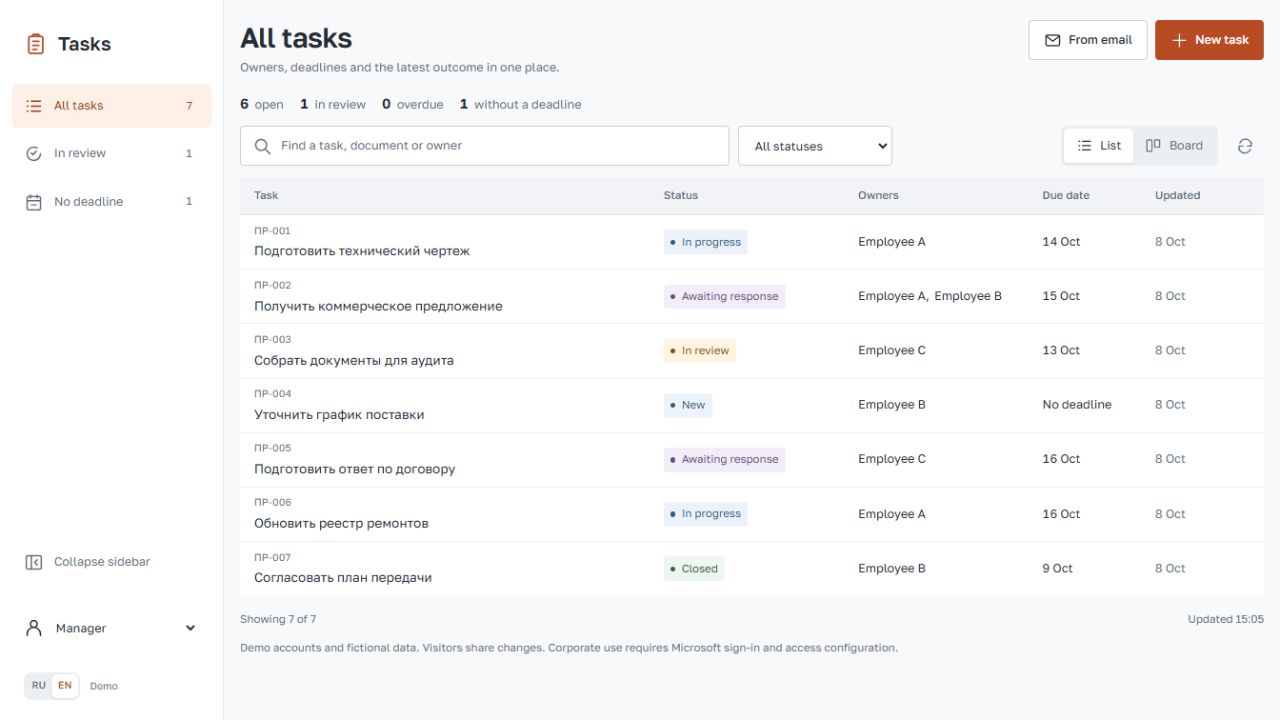
A bilingual web app for tracking team actions, deadlines and outcomes. Managers review progress and accept completed work; registrars maintain records; employees see their assigned tasks. Includes a table, a drag-and-drop board, comments and email-to-draft import.
The starting point
Action items were maintained in Excel, then filtered and sent to employees as separate extracts. Keeping the team overview, individual assignments and the latest updates aligned required repeated manual work.
This prototype explores one shared register. A table supports comparison across the team; a draggable board shows progress. A sliding task drawer keeps the source, expected outcome and discussion beside the task.
From incoming action to accepted result
- Register the action.
Enter the request or prepare a draft from an email, with a reference to its source.
- Assign responsibility.
Select one or more owners, an optional deadline and the expected outcome.
- Keep the latest state visible.
Move a card or select a status; add progress and context to the task history.
- Review and accept.
Submit the result for review. A manager accepts completed work or returns it for follow-up.
Three roles
- Manager
- Reviews the team, assigns work and accepts results after review.
- Registrar
- Registers incoming actions and emails, maintains owners, deadlines and source details. Cannot accept or reopen completed work.
- Employee
- Sees assigned tasks, updates progress and adds comments or results.
From email to a reviewed draft
Drop an EML or TXT file, or paste email text. The subject and body fill a draft. A registrar reviews the action, selects owners and a deadline, and specifies the expected result before saving. Import does not interpret the meaning of a conversation.
The Node.js application and Cloudflare Worker share business rules. The cloud demo stores records in D1; GitHub updates trigger automated checks and deployment.
What the demo includes
The live demo uses fictional records and a role selector. Visitors share changes. Employees receive assigned tasks only; the API also checks access. The demo selector lets visitors try every role and does not establish a real corporate identity.
Microsoft sign-in, mailbox reception, original attachment storage, MSG import and AI analysis are not connected. These are separate integration tasks, not features of the current demo.